- Click on the Alerts Bell at the top of the page
- It will open a new tab for you.
A. This section is where you can come see your alerts.
B. This button allows you to add alerts customized to your needs.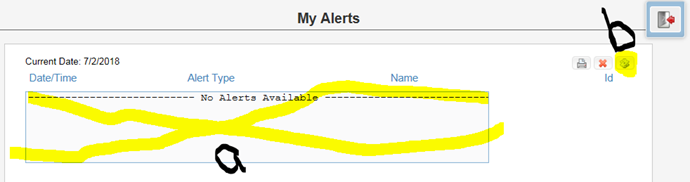
- This will take you to the alert options where you can add your alert.
A. First, you must ensure that 'Activate My Alerts' is set to yes.
B. Then click the green plus sign to the right of the alert options to add an alert.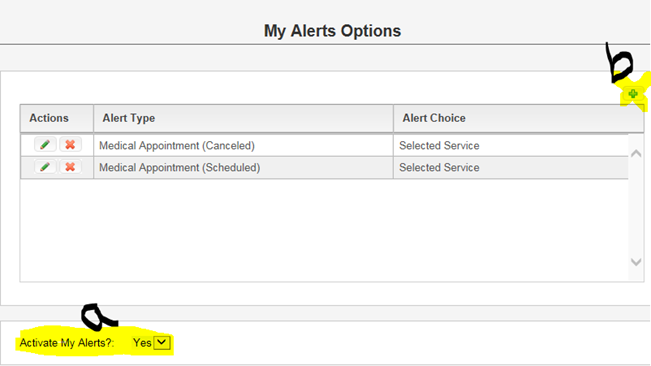
- On this screen:
A. You will need to select an alert type from the drop-box.
B. Who you would like that alert set for (certain people. places, or your case load)
C. You can check the appropriate box and then make your selections from the box that populates based on your selection. (To make multiple selections, click on your first option, then hold the 'control' key when making your next selection.
D. Save your alert.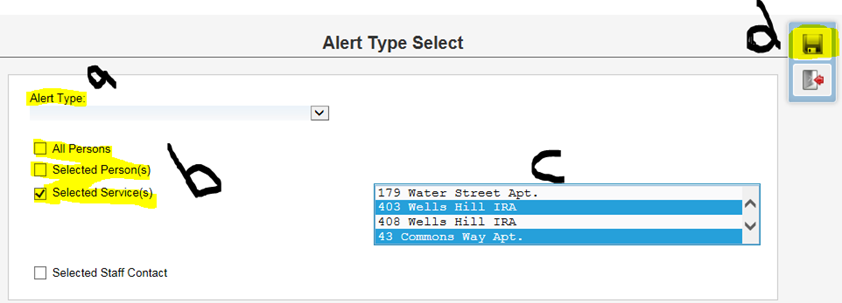
Setting up alerts in Precision Care

Comments
0 comments
Please sign in to leave a comment.